




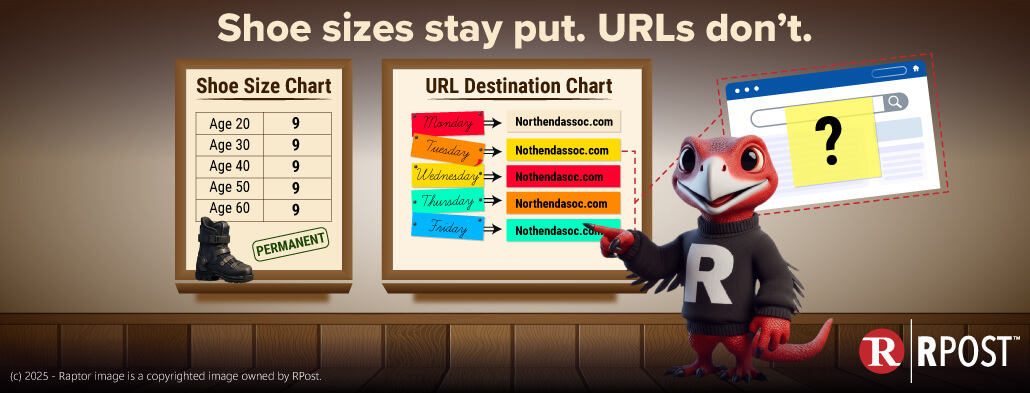
Rocky the raptor here, RPost’s cybersecurity product evangelist. I was in the ski shop the other day, doing what every raptor does around the holidays: soaking in the gear aisle and pretending I need new equipment 😊 I spotted a shiny new ski boot buckle gadget. Sleek. Clever. Possibly unnecessary.
“Wow,” I thought, “maybe Rocky deserves new ski boots.”
Then reality pecked me on the beak. My boots are fine. My raptor feet stopped growing years ago. And once you’re an adult raptor, your shoe size is… well… permanent.
Shoe size doesn’t change when you age.
And that got me thinking,” What Else Do We Assume Is Permanent?”
From a cybersecurity perspective, my brain wandered (as it often does) to URLs. You know how it works: you get an email, there’s a link, you click it, and it takes you to a website. Click it again tomorrow? Same website. Click it next week? Same website. URLs feel permanent, just like shoe size.
But here’s the thing - that assumption is dangerously wrong.
I was recently chatting with an IT guru at one of our friendly law firm colleagues - sharp mind, has seen things... the kind of person who doesn’t get rattled easily.
He told me several large law firms were dealing with data exfiltration -- that fancy cybersecurity phrase meaning “a massive leak of client data.”
And the root cause? URLs do not always resolve the same way, even when they’ve been sitting quietly in an inbox for days. Let that sink in.
The email didn’t change. The link didn’t change. But where the link went changed.
Here’s the playbook cybercriminals are using:
They quietly study how people at a firm communicate with clients, vendors, and partners.
They send a convincing email that looks totally normal -- familiar sender, familiar context.
The email contains a link that, at delivery time, resolves to a high-reputation, benign website.
Inbound email security filters do their job:
Delivered in the evening. No one clicks yet.
Hours or days later, the attacker remotely changes where that same URL resolves.
The next morning, coffee in hand, the user clicks the link -- and now it goes to a look-alike login page, a credential harvester, or malware delivery site.
Same link, different destination. Game over!
This technique has several names - DNS Swapping, DNS rebinding for phishing, Delayed DNS poisoning, Post-delivery URL weaponization, etc...
What’s happening under the hood is not magic; it’s an abuse of standard internet protocols. Attackers are manipulating DNS, the internet’s address book, to change where a domain points after the email is already delivered.
And here’s the kicker: This behavior is technically “normal” from a protocol perspective, which makes it hard to see and harder to stop.
Most email security tools scan URLs once, at delivery, assume resolution is static, and trust reputation at that moment in time. DNS swapping breaks that assumption.
This attack doesn’t defeat security -- it waits it out.
There is no single silver bullet. You need layers -- the way nature (and raptors) intended.
Hooked into outbound email, RAPTOR™ AI detects when attackers are quietly studying correspondence patterns.
Less reconnaissance = weaker impersonation = fewer successful attacks.
Double DLP™ AI continuously monitors URLs that appear in real, ongoing email conversations. If a DNS change occurs after delivery, this is what happens:
This is real-time visibility where most tools go blind.
If a link is clicked and behavior looks suspicious, AI Auto-Lock™ immediately locks access to the destination. No credentials stolen, no malware delivered, and no Monday-morning surprises.
Once you’re an adult, your shoe size doesn’t change. But URLs? They can grow fangs after they’ve matured in your inbox.
That’s why RAPTOR™ AI is a must-have additive layer in any modern cybersecurity deployment -- exactly the kind of layered approach Gartner® highlights in its Magic Quadrant™ for Email Security Platforms, where RPost is recognized among the elite.
Bottom line: stay sharp, stay layered, and never assume a link is as stable as your ski boots.
April 10, 2026

April 03, 2026
March 27, 2026
March 20, 2026
March 13, 2026



 Blog
Blog